Lists, boards & tables
Every list is also a Kanban board and a sortable table. Switch view, don't switch tool.
Everything in the box
List, board, table, timeline, calendar and workload are the same tasks, the same fields and the same filters. Every one of them is on the Free plan. Unlimited adds time tracking, chat and higher caps. Goals and dashboards are on Business.
Five ways to look at the same work, one click apart.
Every list is also a Kanban board and a sortable table. Switch view, don't switch tool.
Drag dates, draw dependencies, mark milestones — and see what slips when something slips.
Everything due this month in one place. Drag a task to a new day to reschedule it.
Who's over capacity, over 7, 14 or 30 days. Group by person, priority, status or tag, with per-person capacity.
Tie the day-to-day to a number. Targets roll up progress automatically as tasks close.
Name your own stages, colour them, cap work-in-progress, and save the set as a reusable template.
Enough structure to scale. Not so much that you need a diagram to explain it.
Three levels, not seven. Deep enough for an agency with thirty clients, shallow enough to explain in a sentence.
Text, number, currency, date, dropdown, checkbox, people. Add the field you need to the list that needs it.
Break the work down, tick it off, and record what has to happen first.
Cut across the hierarchy when the hierarchy isn't the answer.
Weekly reports and monthly invoices reappear on their own instead of living in someone's head.
Save the filter you keep rebuilding, share it with the team, make it the default.
Bring in clients, contractors and the rest of the company — without buying them all a seat.
Discussion attached to the work, threaded replies, and a mention that actually reaches someone.
Nested pages, rich text, PDF export, and a public link when something needs to leave the building.
Take requests from people who'll never log in. Submissions land straight in the right list.
Give a client one list and nothing else. Roles and permissions per space, folder and list.
Per channel and per activity: everything, focused, mentions only, custom, or nothing at all.
Who changed what, when. Including the change nobody will admit to.
A tool your other tools — and your AI assistant — can talk to.
When a task hits a status, move it, assign it, or set a field. Rules you can read out loud.
123+ documented endpoints and scoped API keys. Everything the UI can do, your scripts can do.
89 tools your AI assistant can call directly — create tasks, read lists, log time — no glue code.
Push changes to Slack, a data warehouse, or whatever you've already built.
CSV in from any platform. CSV out, plus a full-workspace JSON export of everything.
Drop a live list into your intranet or client portal. Build a dashboard from the widgets you care about.
Spin up a space, build out lists and fields, assign work and close it out — end to end, with no one ever opening the app.
Every list in IterDone is three views for the price of one: open it as a board and drag cards between custom stages, open the exact same list as a sortable table when you need to scan fifty rows at once, or switch to calendar when the question is "what's due this week." Nothing gets rebuilt when you switch views — it's the same tasks and the same fields, just a different lens.
For work that spans weeks, the timeline lays tasks out against real dates, lets you draw a dependency between two cards so the tool can tell you what slips when something slips, and marks milestones so the whole team can see the shape of a project at a glance. Workload sits alongside it: group by person, priority, status or tag, set a weekly capacity per person, and see who's overloaded — over 7, 14 or 30 days, whichever horizon your team actually plans on. Statuses are yours to name, colour and cap; save a set as a reusable template so a new list starts configured the way your team works, not the way ours does.
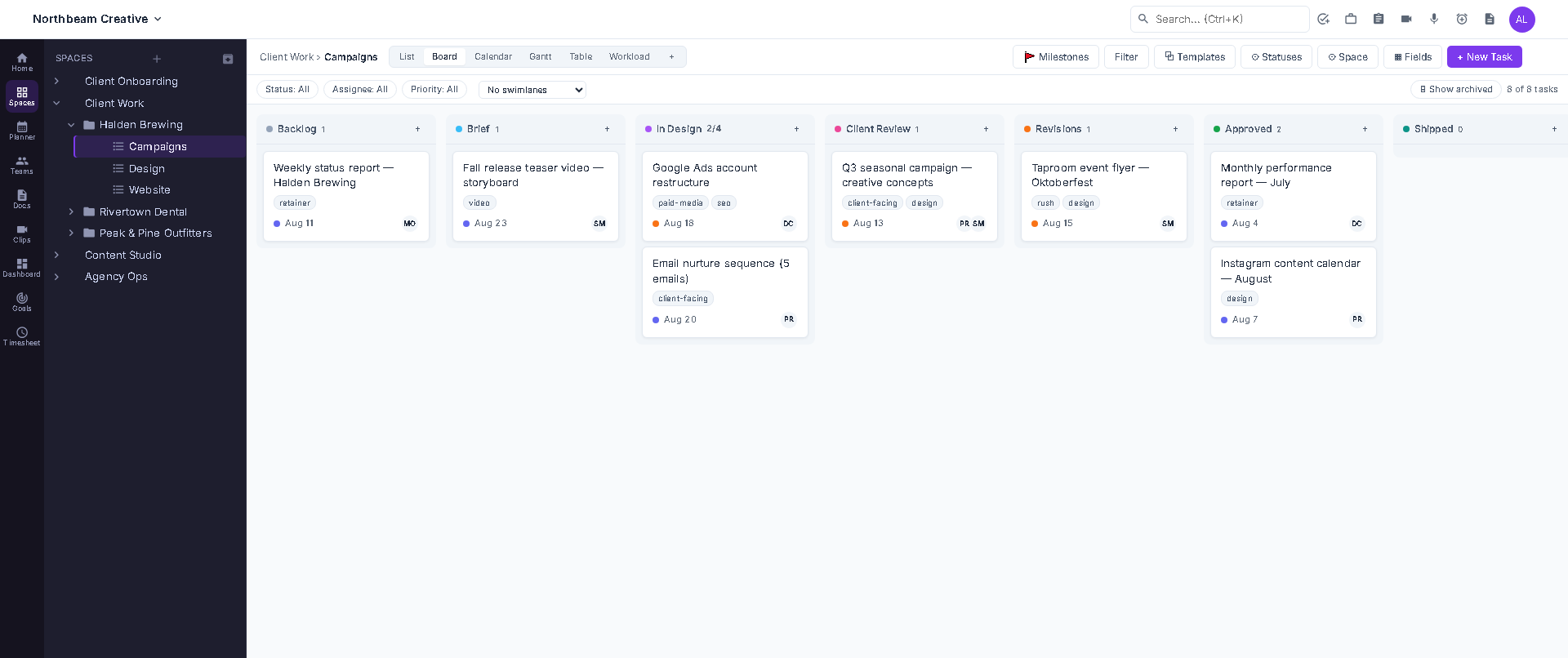
Board view — custom statuses with a work-in-progress cap.
Structure in IterDone is three levels deep — spaces, folders, lists — and deliberately not more. An agency running thirty clients can model each one as a space, with folders for the ongoing retainer and each one-off project, without ever needing a wiki page to explain the hierarchy to a new hire.
Every list can carry its own custom fields — text, number, currency, date, dropdown, checkbox, people — so a dev team can add "Severity" and "Environment" to their list without those fields showing up on anyone else's. Break bigger items down with subtasks and checklists, record what has to finish first with dependencies, and cut across the whole hierarchy with tags, priorities and task types when the hierarchy itself isn't the right question. Recurring tasks bring the weekly report or the monthly invoice back on their own, and a saved view remembers the filter you were about to rebuild for the third time this month — share it with the team, or make it everyone's default.
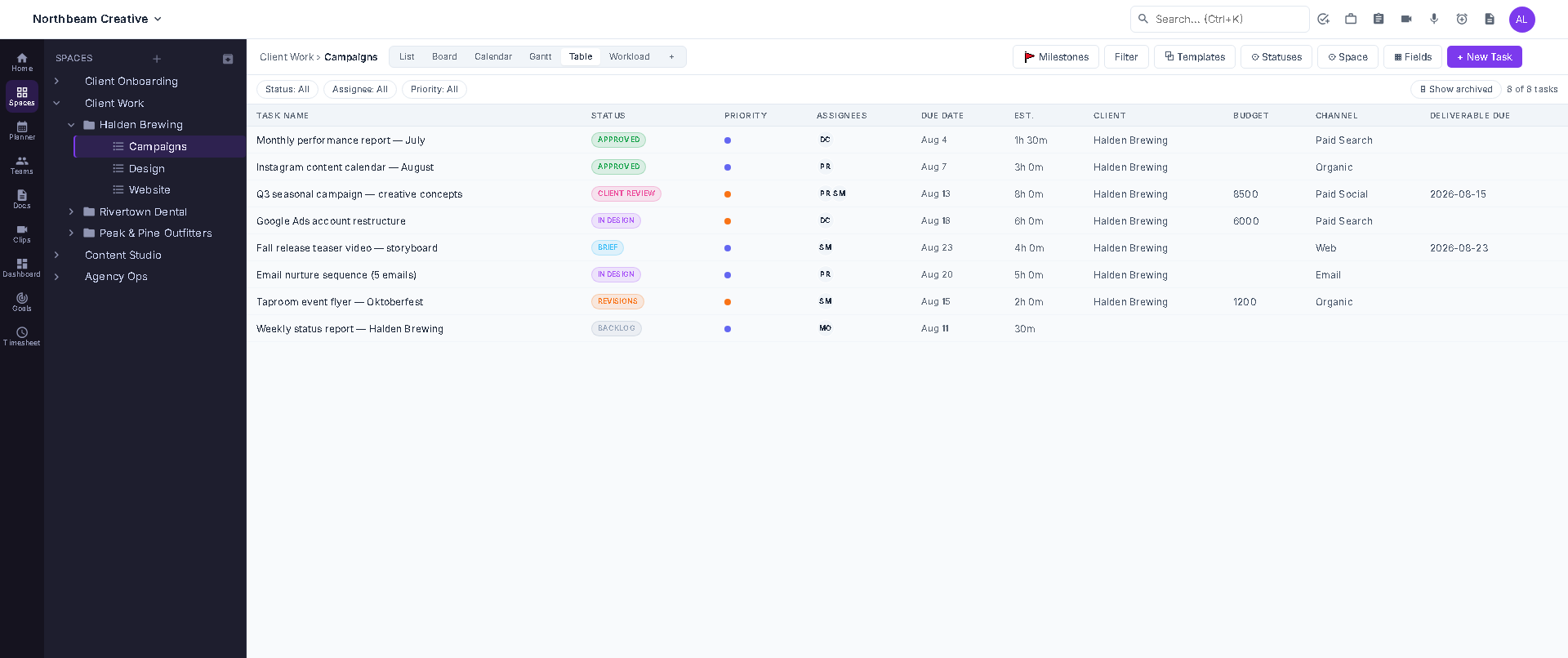
Table view — the same list, with the custom fields your list needs.
Comments live on the task they're about, threaded so a reply stays attached to what it's replying to, and an @mention actually reaches the person it names. Docs sit next to the work instead of in a separate tool — nested pages, rich text, PDF export, and when something needs to leave the building, a public link that doesn't require the reader to have an account.
Guests make the client-and-contractor problem simple: invite someone as a guest, scope them to a single list, and they see exactly that and nothing else — no seat to buy, no risk of them wandering into another client's folder. A public form turns "can you just email me the request" into a submission that lands directly in the right list. And because none of that is useful if it turns into noise, notifications are controlled per channel and per activity — everything, focused, mentions only, custom, or off.
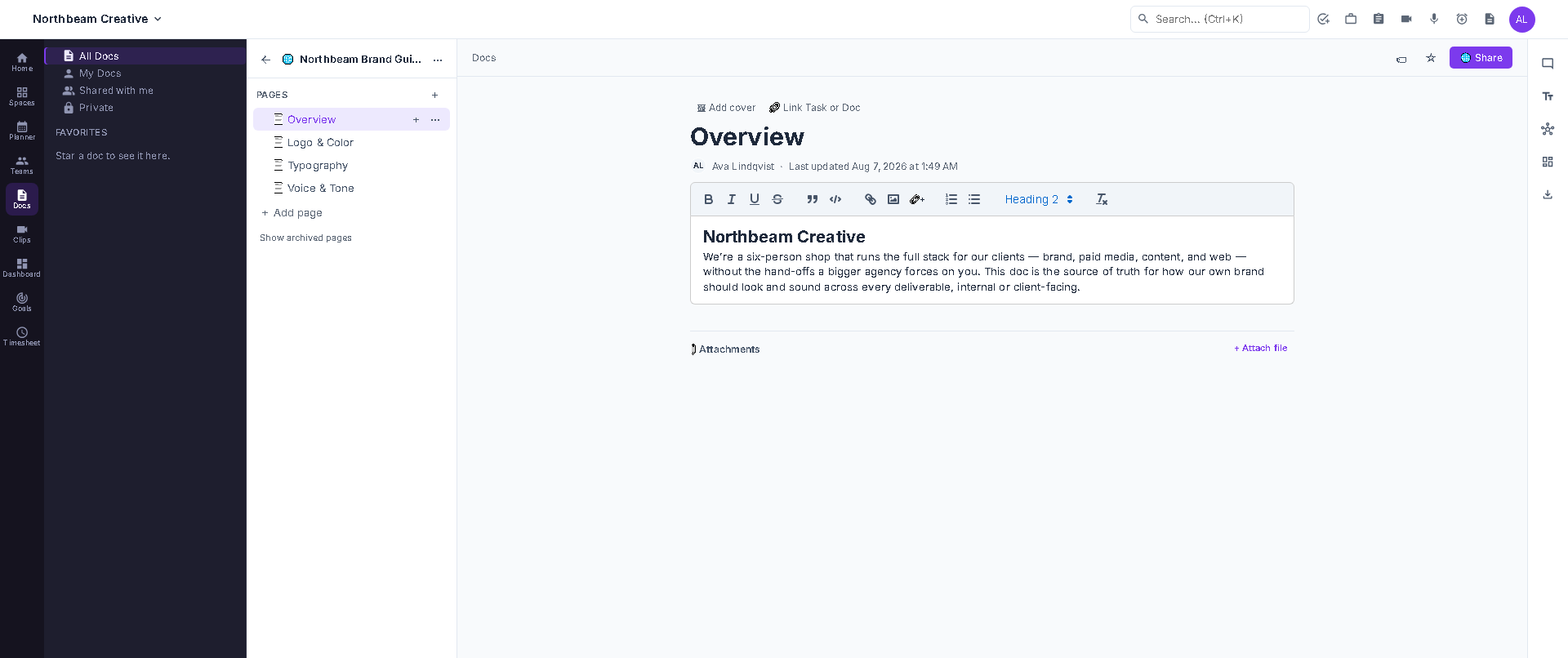
Docs — nested pages, and a public link for anything that needs to leave the building.
Automations watch for a task hitting a status and then move it, assign it or set a field — rules simple enough to read out loud, not a flowchart builder you need a manual for. When you need more than the built-in rules, the REST API exposes the same 123+ endpoints the app itself uses, behind scoped API keys so a script only touches what you let it touch.
Webhooks push changes out to Slack, a data warehouse, or whatever you've already built. For teams working alongside an AI assistant, the built-in MCP server hands it 89 tools directly — create a task, read a list, log time — with no glue code in between. And when it's time to move data instead of watch it move, CSV import and export cover a single list, while a full-workspace JSON export covers everything: tasks, docs, fields and comments.
Between the two, the API and MCP server cover the same ground the UI does — spinning up a space, laying out lists and custom fields, assigning and closing tasks — so a workspace can be run entirely headless. Point an agent at it and it can operate the whole board on its own; log in when you want to look, not because you have to.
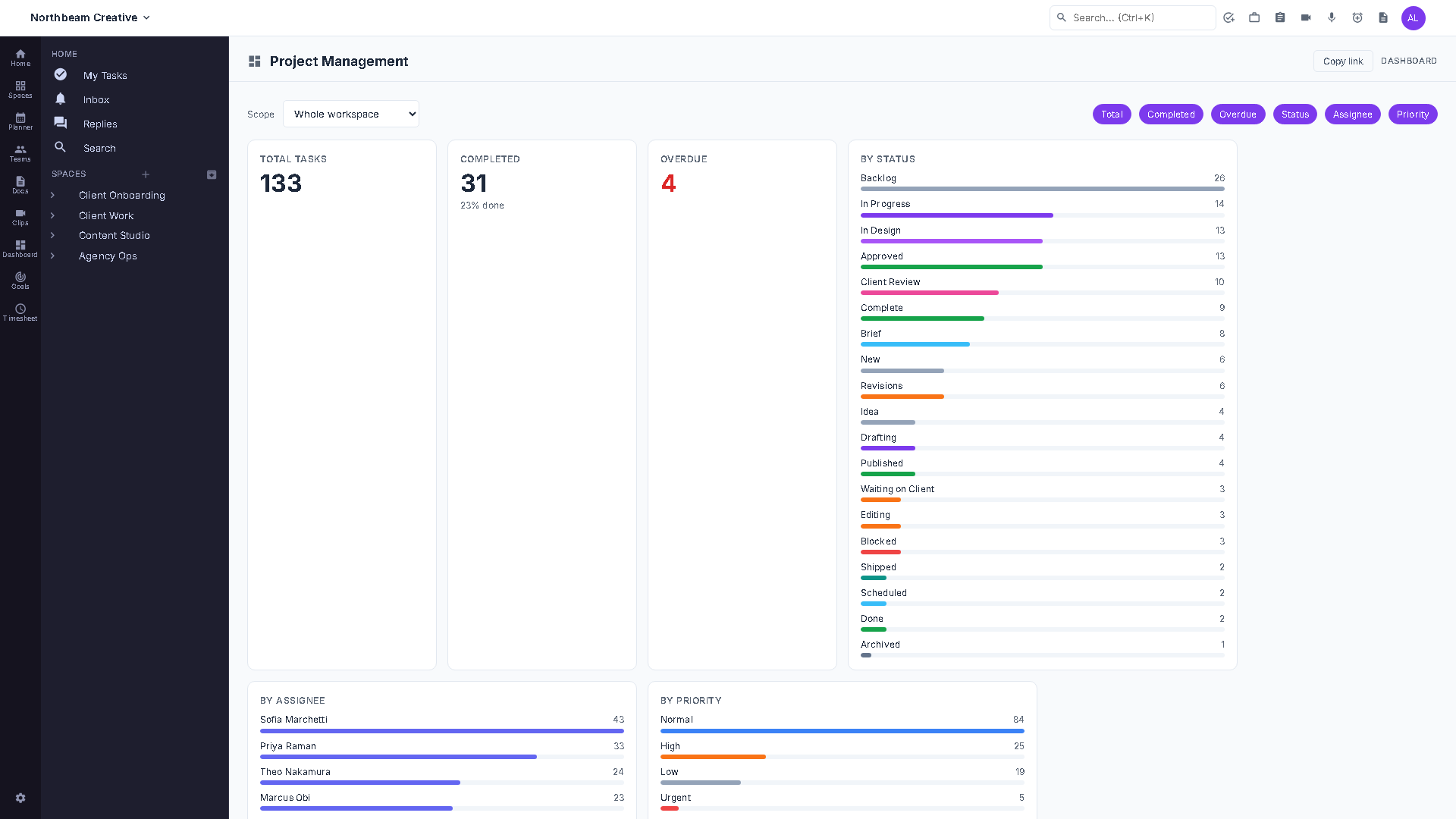
Dashboards — the same data your API keys and webhooks can reach.
Where teams land
Most teams start in a spreadsheet, outgrow it, buy something enormous, and end up administering software instead of shipping work. There is a stop in between.
| Capability | A spreadsheet | An enterprise platform | IterDone |
|---|---|---|---|
| Time to first real task | Minutes — until it sprawls | Days or weeks of rollout | An afternoon, import included |
| What a new hire has to learn | Where the tabs are | A course, sometimes a certification | Nothing. Open it and it's obvious |
| Views of the same work | One, and it's a grid | Fifteen, twelve unused | Six, all one click apart |
| Clients & contractors | Email them a copy | Buy them a seat | Invite them as free guests, scoped to one list |
| Automation & AI access | None | Add-on, often billed per member | Included — REST API, webhooks and 89 MCP tools |
| Getting your data out | It's already a file | A support ticket and a lossy export | CSV or full-workspace JSON, any time |
FAQ
The things people ask before they sign up.
Most teams import a CSV and invite people the same afternoon. There is no implementation project, no admin certification and no consultant — if you can describe your work as lists of tasks, you can be running today.
The Free plan includes the six views, docs, forms, the REST API and MCP, and guests and viewers are always free. Unlimited and Business are priced per member per month, with a lower annual price. Unlimited adds time tracking, chat and higher caps. Business adds goals, dashboards and plugins. Enterprise is custom. See the pricing page for current prices — nothing is billed until you choose a paid plan.
Yes. Export a CSV from your current tool and upload it. Task names, statuses, priorities, assignees and due dates come across in one pass. There's a full-workspace JSON importer for larger migrations.
Any time, without asking us. CSV export per list, and a full-workspace JSON export covering tasks, docs, custom fields and comments.
No. Invite them as guests and scope them to a single list — they see their work and nothing else.
Both. 123+ REST endpoints with scoped API keys, outbound webhooks, and a built-in MCP server exposing 89 tools so an AI assistant can create tasks, read lists and log time directly.
Yes. The REST API and MCP server cover the same ground the UI does — create a space, build out lists and custom fields, assign and close tasks — so an AI agent or a script can run a workspace end to end. Log in when you want to look; you never have to.
No. It runs in any modern browser on desktop or phone. Nothing to install, nothing to update.
Every company's workspace lives in its own isolated database. Passwords are hashed, all traffic is encrypted in transit, and we don't sell your data.
IterDone is built and operated by Pangloss Technologies. Read more about us, check the system status, or get in touch — you'll reach the people who write the code.
Create your workspace, bring your work across, and get the afternoon back. Iterate until done.
Learn more